| Mirage Source http://www.miragesource.net/forums/ |
|
| Automation Error... http://www.miragesource.net/forums/viewtopic.php?f=201&t=5049 |
Page 1 of 11 |
| Author: | Nean [ Sun Feb 01, 2009 10:11 pm ] |
| Post subject: | Automation Error... |
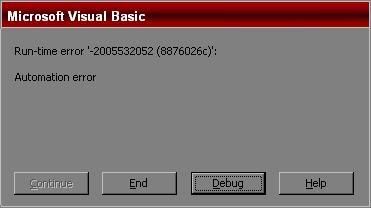
Trying to render the guild name over players head, and it doesn't seem to want to work. ![]() Code: TexthDC = DDS_BackBuffer.GetDC ' Lock the backbuffer so we can draw text and names Code: For i = 1 To PlayersOnMapHighIndex Call DrawPlayerGuild(PlayersOnMap(i)) Next Code: Sub DrawPlayerGuild(ByVal Index As Long)
Dim TextX As Long Dim TextY As Long Dim Color As Long ' Check guild rank level to determine color If GetPlayerPK(Index) = NO Then Select Case Player(Index).GuildRank Case 0 Color = QBColor(Brown) Case 1 Color = QBColor(DarkGrey) Case 2 Color = QBColor(Cyan) Case 3 Color = QBColor(Blue) Case 4 Color = QBColor(Pink) End Select Else Color = QBColor(BrightRed) End If ' Determine location for text TextX = GetPlayerX(Index) * PIC_X + Player(Index).XOffset + (PIC_X \ 2) - ((Len(GetPlayerName(Index)) / 2) * 8) TextY = GetPlayerY(Index) * PIC_Y + Player(Index).YOffset - (PIC_Y \ 2) - 2 ' Draw name Call DrawText(TexthDC, TextX, TextY, GetPlayerGuild(Index), Color) End Sub |
|
| Author: | Robin [ Sun Feb 01, 2009 10:16 pm ] |
| Post subject: | Re: Automation Error... |
Make sure you unlock the DC after you've rendered the text. |
|
| Author: | Nean [ Sun Feb 01, 2009 10:32 pm ] |
| Post subject: | Re: Automation Error... |
I've tried to put Code: ' Release DC Call DDS_BackBuffer.ReleaseDC(TexthDC) Everywhere. Doesn't work |
|
| Author: | Robin [ Sun Feb 01, 2009 10:43 pm ] |
| Post subject: | Re: Automation Error... |
Rather than making an entire new loop, just put; Code: Call DrawPlayerGuild(PlayersOnMap(i)) Under the call for DrawPlayerName. Then, tell me what line it errors on. Remove any extra DC locks or unlocks you added. |
|
| Author: | Nean [ Sun Feb 01, 2009 11:05 pm ] |
| Post subject: | Re: Automation Error... |
It errors on the same line. Code: ErrorHandle: If Err.Number = 91 Then Sleep 100 Call ReInitDD Err.Clear Exit Sub End If TexthDC = DDS_BackBuffer.GetDC ' Lock the backbuffer so we can draw text and names Call DrawText(TexthDC, 10, 15, "Error Rendering Graphics - Unhandled Error", QBColor(BrightRed)) Call DrawText(TexthDC, 10, 28, "Error Number : " & Err.Number & " - " & Err.Description, QBColor(BrightCyan)) GoTo Continue End Sub On Code: TexthDC = DDS_BackBuffer.GetDC ' Lock the backbuffer so we can draw text and names
|
|
| Author: | Lea [ Mon Feb 02, 2009 3:05 am ] |
| Post subject: | Re: Automation Error... |
is it already locked? |
|
| Author: | Nean [ Mon Feb 02, 2009 3:40 am ] |
| Post subject: | Re: Automation Error... |
Lea wrote: is it already locked? I believe so. |
|
| Author: | Lea [ Mon Feb 02, 2009 4:52 am ] |
| Post subject: | Re: Automation Error... |
locking a locked surface would cause an automation error. |
|
| Author: | Robin [ Mon Feb 02, 2009 12:02 pm ] |
| Post subject: | Re: Automation Error... |
Robin wrote: Rather than making an entire new loop, just put;
Code: Call DrawPlayerGuild(PlayersOnMap(i)) Under the call for DrawPlayerName. Then, tell me what line it errors on. Remove any extra DC locks or unlocks you added. |
|
| Author: | Nean [ Mon Feb 02, 2009 2:11 pm ] |
| Post subject: | Re: Automation Error... |
Robin wrote: Robin wrote: Rather than making an entire new loop, just put; Code: Call DrawPlayerGuild(PlayersOnMap(i)) Under the call for DrawPlayerName. Then, tell me what line it errors on. Remove any extra DC locks or unlocks you added. I did. There are only two DC Unlocks in my whole project. And three locks.... I'm assuming that's it? |
|
| Author: | Nean [ Mon Feb 02, 2009 2:16 pm ] |
| Post subject: | Re: Automation Error... |
I set an unlock bfore a new lock and I get this: Code: Call DrawText(TexthDC, 10, 15, "Error Rendering Graphics - Unhandled Error", QBColor(BrightRed)) (They appear on the screen)
Call DrawText(TexthDC, 10, 28, "Error Number : " & Err.Number & " - " & Err.Description, QBColor(BrightCyan)) |
|
| Author: | Robin [ Mon Feb 02, 2009 2:47 pm ] |
| Post subject: | Re: Automation Error... |
Nean wrote: I set an unlock bfore a new lock and I get this: Code: Call DrawText(TexthDC, 10, 15, "Error Rendering Graphics - Unhandled Error", QBColor(BrightRed)) (They appear on the screen)Call DrawText(TexthDC, 10, 28, "Error Number : " & Err.Number & " - " & Err.Description, QBColor(BrightCyan)) STOP MAKING NEW LOCKS AND UNLOCKS |
|
| Author: | Nean [ Mon Feb 02, 2009 11:02 pm ] |
| Post subject: | Re: Automation Error... |
Robin wrote: Nean wrote: I set an unlock bfore a new lock and I get this: Code: Call DrawText(TexthDC, 10, 15, "Error Rendering Graphics - Unhandled Error", QBColor(BrightRed)) (They appear on the screen)Call DrawText(TexthDC, 10, 28, "Error Number : " & Err.Number & " - " & Err.Description, QBColor(BrightCyan)) STOP MAKING NEW LOCKS AND UNLOCKS Awww Okay. I stopped. I'll probably try this from a new source. xDD |
|
| Author: | Nean [ Tue Feb 03, 2009 1:44 am ] |
| Post subject: | Re: Automation Error... |
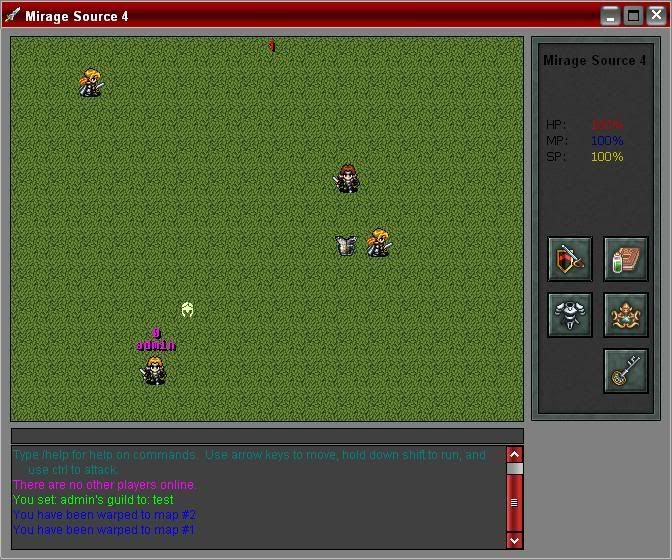
Alright so I got it to work... Sorta. No errors, but this is what I get when it draws my "guild" ![]() Code: If GetPlayerGuild(i) <> vbNullString Then For i = 1 To PlayersOnMapHighIndex Call DrawPlayerGuild(PlayersOnMap(i)) Next i End If Code: Public Sub DrawPlayerGuild(ByVal Index As Long)
Dim TextX As Long Dim TextY As Long Dim Color As Long ' Check access level to determine color If GetPlayerPK(Index) = NO Then Select Case GetPlayerAccess(Index) Case 0 Color = QBColor(Brown) Case 1 Color = QBColor(DarkGrey) Case 2 Color = QBColor(Cyan) Case 3 Color = QBColor(Blue) Case 4 Color = QBColor(Pink) End Select Else Color = QBColor(BrightRed) End If ' Determine location for text TextX = GetPlayerX(Index) * PIC_X + Player(Index).XOffset + (PIC_X \ 2) - ((Len(GetPlayerGuild(Index)) / 2) * 8) TextY = GetPlayerY(Index) * PIC_Y + Player(Index).YOffset - (PIC_Y \ 2) - 16 ' Draw name Call DrawText(TexthDC, TextX, TextY, GetPlayerGuild(Index), Color) End Sub |
|
| Author: | Matt [ Tue Feb 03, 2009 2:11 am ] |
| Post subject: | Re: Automation Error... |
The packet isn't parsing the guild. |
|
| Author: | Nean [ Tue Feb 03, 2009 2:20 am ] |
| Post subject: | Re: Automation Error... |
Matt wrote: The packet isn't parsing the guild. How do I do that? I thought I was doing it right, seeing as how i can do /info and it shows me my guild. :\ |
|
| Author: | Matt [ Tue Feb 03, 2009 3:19 am ] |
| Post subject: | Re: Automation Error... |
In every instance of the playerdata packet, you need to add "getplayerguild(index)" to the end of it, then make the client receive it. |
|
| Author: | Nean [ Tue Feb 03, 2009 3:42 am ] |
| Post subject: | Re: Automation Error... |
Matt wrote: In every instance of the playerdata packet, you need to add "getplayerguild(index)" to the end of it, then make the client receive it. Much appreciated. I should've figured that one out. |
|
| Author: | Robin [ Tue Feb 03, 2009 10:29 am ] |
| Post subject: | Re: Automation Error... |
Glad you got it working, but next time I tell you to do something, do it xD So damn aggrivating. |
|
| Author: | Nean [ Tue Feb 03, 2009 2:03 pm ] |
| Post subject: | Re: Automation Error... |
Robin wrote: Glad you got it working, but next time I tell you to do something, do it xD So damn aggrivating. No, I was. I honestly was. I'm not that stupid. It was just that I didn't change the write thing in the DrawPlayerGuild, so it was trying to draw two names, and that's what was screwing things up. It was when I did what you said, and it didn't work, that I started making more locks/unlocks. |
|
| Author: | Matt [ Tue Feb 03, 2009 4:45 pm ] |
| Post subject: | Re: Automation Error... |
Feel free to add me on GTalk if you need help in the future, Nean. It's easier to help you over a messenger, than to sift through all the insults on these forums. |
|
| Author: | Robin [ Tue Feb 03, 2009 4:54 pm ] |
| Post subject: | Re: Automation Error... |
Matt wrote: Feel free to add me on GTalk if you need help in the future, Nean. It's easier to help you over a messenger, than to sift through all the insults on these forums. Yeah, go ahead and add me too. Matt smells. |
|
| Author: | Matt [ Tue Feb 03, 2009 5:22 pm ] |
| Post subject: | Re: Automation Error... |
It's the weed and alcohol. I can't help it. |
|
| Author: | Nean [ Wed Feb 04, 2009 12:03 am ] |
| Post subject: | Re: Automation Error... |
Alright, I'll add you guys. =] |
|
| Page 1 of 11 | All times are UTC |
| Powered by phpBB® Forum Software © phpBB Group https://www.phpbb.com/ |
|