| Mirage Source http://www.miragesource.net/forums/ |
|
| Text errors http://www.miragesource.net/forums/viewtopic.php?f=201&t=4306 |
Page 1 of 2 |
| Author: | Nean [ Sat Sep 13, 2008 8:30 pm ] |
| Post subject: | Text errors |
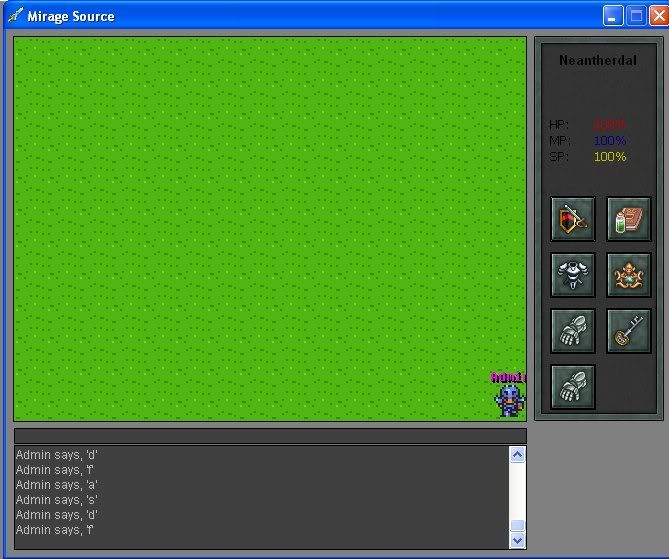
Okay, so I made it so that the way the admin system is: ADMIN_VIP As Byte = 1 ADMIN_MONITER As Byte = 2 And so on. Now I was making it so that VIP members can talk back and forth to each other, and each other only by using typing * before a message, much like an Admin message, or the like. However, when I get done modifying everything, I try to login to the client, and type. But I get an error that says: End If, without block If. So I delete the End If. However, after that everything I type is automatically submitted. Like so: ![]() It doesn't do this when I don't add the VIP system, but it does when I do, so thats obviously the problem. I messed around, but can't find a fix. Any help would deeply be appreciated. Also I'm using MS4. Oh and inb4: "VIP SYSTEM IS GHEY, NO ONE WILL PAY MONIEZ" I'm just using it for practice, and possibly for long playing members or whatnot. |
|
| Author: | Matt [ Sat Sep 13, 2008 8:43 pm ] |
| Post subject: | Re: Text errors |
Add a variable to the player's account, we'll call it "isvip". Save it as a byte, etc, etc. Then do a check, when a player sends a message with the * in front of it (server side, obviously) and if the isvip is 1, send the message. If it's 0, cut the * off the message and send it to the map. That covers the chatting aspect of the vip stuff. When you wanna add more vip stuff, you simply could check if they are vip first and if so, commence the code. |
|
| Author: | Nean [ Sat Sep 13, 2008 8:49 pm ] |
| Post subject: | Re: Text errors |
Perfekt wrote: Add a variable to the player's account, we'll call it "isvip". Save it as a byte, etc, etc. Then do a check, when a player sends a message with the * in front of it (server side, obviously) and if the isvip is 1, send the message. If it's 0, cut the * off the message and send it to the map. That covers the chatting aspect of the vip stuff. When you wanna add more vip stuff, you simply could check if they are vip first and if so, commence the code. Wait. How the hell do I edit a characters file? They're saved as .bin's in MS4, and when I change the extension to .ini it's just distorted code. I see what you mean, now. And I understand it. I just need to know how to edit an account. Thanks for the help though. I didn't really think that over. EDIT: Okay, so when I type the * and the message, all it does is it displays the Admin message color, as it shouldn't. And before the message it says (admin Admin)... HALP PLZ |
|
| Author: | Matt [ Sat Sep 13, 2008 9:38 pm ] |
| Post subject: | Re: Text errors |
You need to create an all new message handler for it. You just add the isvip as byte to the player rec, delete the accounts and start fresh, or create an account converter. MS4 uses binary accounts. That's why you can't just change it to .ini Then you create an admin command like /givevip and then you send a packet to the server, with the name of the player (ie: /givevip Perfekt), then you have the server set the player's isvip variable to 1. |
|
| Author: | Lea [ Sat Sep 13, 2008 10:32 pm ] |
| Post subject: | Re: Text errors |
MSE4 uses binary accounts and you'll need a seperate editor (like a modified Valkorian Editor http://www.valkoria.com) to edit them. To add values, it's pretty much a rewrite of the account. If it's not too late, delete the accounts after the changes, and everything should work. |
|
| Author: | Nean [ Sat Sep 13, 2008 11:45 pm ] |
| Post subject: | Re: Text errors |
So I didn't use Perfeckts Idea (wasn't smart enough to figure it out), so I just went ahead and redid it and made it so that it went ADMIN_VIP As Byte =1 ADMIN_MONITER as Byte = 2 ADMIN_MAPPER, etc, etc. And then I made it check to make sure that the person was access 1 or higher, to use it. And it works fine. So now all I have to do is make it check if it's level 1 access, to do something. Isn't that the smartest way to do it? |
|
| Author: | Anthony [ Sat Sep 13, 2008 11:47 pm ] |
| Post subject: | Re: Text errors |
Did you add a new variable to the player UDT? Or what are you checking to see if the player has access? |
|
| Author: | Nean [ Sat Sep 13, 2008 11:48 pm ] |
| Post subject: | Re: Text errors |
Anthony wrote: Did you add a new variable to the player UDT? Or what are you checking to see if the player has access? UDT? I'm sorry, I'm very much n00bish. Anyways, heres what I have: Code: ' VIP Message If Mid$(ChatText, 1, 1) = "#" Then ChatText = Mid$(ChatText, 2, Len(ChatText) - 1) If Len(ChatText) > 0 Then If GetPlayerAccess(MyIndex) >= 0 Then Call VIPMsg(MyText) End If MyText = vbNullString frmMirage.txtMyChat.Text = vbNullString Exit Sub End If End If Does that answer your question? |
|
| Author: | Lea [ Sat Sep 13, 2008 11:53 pm ] |
| Post subject: | Re: Text errors |
If you're doing it using access levels, you wont need to add anything to the player's account. Access levels should work fine, but you'll need to change all the access level checks that are everywhere. |
|
| Author: | Nean [ Sat Sep 13, 2008 11:58 pm ] |
| Post subject: | Re: Text errors |
Lea wrote: If you're doing it using access levels, you wont need to add anything to the player's account. Access levels should work fine, but you'll need to change all the access level checks that are everywhere. Yeah. It's actually really convenient. And the cool thing is, rather than using numbers. Most of the time that something is checking the access it is actually checking the name like "If GetPlayerAccess > ADMIN_MONITER and stuff, so it's all good. |
|
| Author: | Lea [ Sun Sep 14, 2008 12:00 am ] |
| Post subject: | Re: Text errors |
Then you should add an ADMIN_VIP constant and use that, too And don't assume everywhere uses the constants. Personally check every one yourself. |
|
| Author: | Robin [ Sun Sep 14, 2008 12:01 am ] |
| Post subject: | Re: Text errors |
That is a number. Go into modConstants. You've just saved the number as a constant value with a useful name. |
|
| Author: | Nean [ Sun Sep 14, 2008 12:17 am ] |
| Post subject: | Re: Text errors |
Lea wrote: Then you should add an ADMIN_VIP constant and use that, too And don't assume everywhere uses the constants. Personally check every one yourself. like this: Code: ' Admin constants Public Const ADMIN_VIP As Byte = 1 Public Const ADMIN_MONITER As Byte = 2 Public Const ADMIN_MAPPER As Byte = 3 Public Const ADMIN_DEVELOPER As Byte = 4 Public Const ADMIN_CREATOR As Byte = 5 Robin wrote: That is a number. Go into modConstants. You've just saved the number as a constant value with a useful name. I'm starting to get things. So basically that string just represents the integer 1? |
|
| Author: | Matt [ Sun Sep 14, 2008 1:20 am ] |
| Post subject: | Re: Text errors |
My idea was super simple.. O.o |
|
| Author: | Lea [ Sun Sep 14, 2008 1:20 am ] |
| Post subject: | Re: Text errors |
It's a byte, and that's correct. You'd get the same effect if you wrote a number 1 everywhere there was a ADMIN_VIP. Giving it a textual representation gives the constant meaning, making it easier to remember and eliminating "Magic numbers" |
|
| Author: | Nean [ Sun Sep 14, 2008 1:23 am ] |
| Post subject: | Re: Text errors |
Perfekt wrote: My idea was super simple.. O.o I know, and it was a good one too. I'm just not very good at this. Sorry. T_T;; Thanks for the help though, with your advice I got it done. @Dave: Thanks for the confirmation, I think i'm getting the hang of this now. |
|
| Page 1 of 2 | All times are UTC |
| Powered by phpBB® Forum Software © phpBB Group https://www.phpbb.com/ |
|