303 I think it's in modTypes.
MSE1, I THINK it's in modDeclares.
Could also press alt+F and search for it.

| Mirage Source http://www.miragesource.net/forums/ |
|
| Map Size http://www.miragesource.net/forums/viewtopic.php?f=201&t=2613 |
Page 1 of 3 |
| Author: | NejiHyuga [ Mon Sep 03, 2007 12:31 pm ] |
| Post subject: | Map Size |
Where do you go to change the map size of the game? Like i may want it like elyisum. |
|
| Author: | Matt [ Mon Sep 03, 2007 1:04 pm ] |
| Post subject: | Re: Map Size |
MAX_MAP_X MAX_MAP_Y |
|
| Author: | NejiHyuga [ Mon Sep 03, 2007 1:07 pm ] |
| Post subject: | Re: Map Size |
What module is it in server side? |
|
| Author: | Matt [ Mon Sep 03, 2007 1:09 pm ] |
| Post subject: | Re: Map Size |
303 I think it's in modTypes. MSE1, I THINK it's in modDeclares. Could also press alt+F and search for it.
|
|
| Author: | NejiHyuga [ Mon Sep 03, 2007 1:10 pm ] |
| Post subject: | Re: Map Size |
Alright, thanks for your help.  Is this it? ' Convert NewMap.Name = OldMap.Name NewMap.Revision = OldMap.Revision + 1 NewMap.Moral = OldMap.Moral NewMap.Up = OldMap.Up NewMap.Down = OldMap.Down NewMap.Left = OldMap.Left NewMap.Right = OldMap.Right NewMap.Music = OldMap.Music NewMap.BootMap = OldMap.BootMap NewMap.BootX = OldMap.BootX NewMap.BootY = OldMap.BootY NewMap.Shop = OldMap.Shop For y = 0 To MAX_MAPY For x = 0 To MAX_MAPX |
|
| Author: | Robin [ Mon Sep 03, 2007 1:26 pm ] |
| Post subject: | Re: Map Size |
NejiHyuga wrote: Alright, thanks for your help. Is this it? ' Convert NewMap.Name = OldMap.Name NewMap.Revision = OldMap.Revision + 1 NewMap.Moral = OldMap.Moral NewMap.Up = OldMap.Up NewMap.Down = OldMap.Down NewMap.Left = OldMap.Left NewMap.Right = OldMap.Right NewMap.Music = OldMap.Music NewMap.BootMap = OldMap.BootMap NewMap.BootX = OldMap.BootX NewMap.BootY = OldMap.BootY NewMap.Shop = OldMap.Shop For y = 0 To MAX_MAPY For x = 0 To MAX_MAPX You need to find where MAX_MAPX and MAX_MAPY are set. So search for this: Code: max_mapx =
|
|
| Author: | NejiHyuga [ Mon Sep 03, 2007 1:34 pm ] |
| Post subject: | Re: Map Size |
Ok, i'm having a error with this. I change the MAPX AND Y on server and client, still didn't work. Any help? Thanks, Joachim. |
|
| Author: | Coke [ Tue Sep 04, 2007 1:42 am ] |
| Post subject: | Re: Map Size |
brb cutting my own wrists... k back. Server side: max_mapx = 1 max_mapy = 1 Client side: max_mapx = 1 max_mapy=1 Delete all maps server side. Gratz you now have 2x2 maps. The endz. |
|
| Author: | NejiHyuga [ Tue Sep 04, 2007 9:14 pm ] |
| Post subject: | Re: Map Size |
Edit: I change the map size of x and y and as well as theserver folder and cleint and the maps just coming back and nothing is happening. |
|
| Author: | James [ Wed Sep 05, 2007 3:10 pm ] |
| Post subject: | Re: Map Size |
You also have to change the size of your picScreen on frmMirage to make sure you can SEE the bigger maps. Make it 32 pixels wider/higher respectively for each x and y increase |
|
| Author: | Rezeyu [ Wed Sep 05, 2007 10:17 pm ] |
| Post subject: | Re: Map Size |
There IS a tutorial on this.. |
|
| Author: | NejiHyuga [ Wed Sep 05, 2007 10:25 pm ] |
| Post subject: | Re: Map Size |
Where??? |
|
| Author: | Rezeyu [ Wed Sep 05, 2007 10:45 pm ] |
| Post subject: | Re: Map Size |
In Tutorials section probably.. Yep, here, a picScreen tutorial for changing map size: viewtopic.php?f=75&t=175 |
|
| Author: | NejiHyuga [ Fri Sep 07, 2007 9:55 pm ] |
| Post subject: | Re: Map Size |
Ok, the map size works, I have another question. Do you no how to keep fullscreen and not restore down? |
|
| Author: | William [ Fri Sep 07, 2007 10:18 pm ] |
| Post subject: | Re: Map Size |
NejiHyuga wrote: Ok, the map size works, I have another question. Do you no how to keep fullscreen and not restore down? Please create a new topic for new questions. So people know what they are looking at. There are tutorials for fullscreen. |
|
| Author: | NejiHyuga [ Fri Sep 07, 2007 10:33 pm ] |
| Post subject: | Re: Map Size |
Ok, i'll do that now. Also thanks for helping me. EDIT: Still couldn't find it, i used search |
|
| Author: | Rezeyu [ Sat Sep 08, 2007 3:15 am ] |
| Post subject: | Re: Map Size |
Search doesn't work for old topics. |
|
| Author: | NejiHyuga [ Sat Sep 08, 2007 11:17 am ] |
| Post subject: | Re: Map Size |
Oh, i didn't know about that.. |
|
| Author: | Rezeyu [ Sat Sep 08, 2007 11:32 am ] |
| Post subject: | Re: Map Size |
I didn't either till I was trying to search for one of my own posts.. XD |
|
| Author: | NejiHyuga [ Sat Sep 08, 2007 1:49 pm ] |
| Post subject: | Re: Map Size |
I used ControlBox and i put fullscreen instead but when i get on client, i get a runtimeerror9. |
|
| Author: | Coke [ Sat Sep 08, 2007 3:05 pm ] |
| Post subject: | Re: Map Size |
Maybe you should try working on something a lil easier first.. like learning to use notepad or something ^_^ I even searched the tutorial for you :* How to use notepad |
|
| Author: | NejiHyuga [ Sat Sep 08, 2007 3:43 pm ] |
| Post subject: | Re: Map Size |
Eh? I think i fix it..Also i forgot to change the screen in some ways. Like the top of the screen for example. I'll ask anymore questiions about this if i get another error. EDIT: ok i get this error. 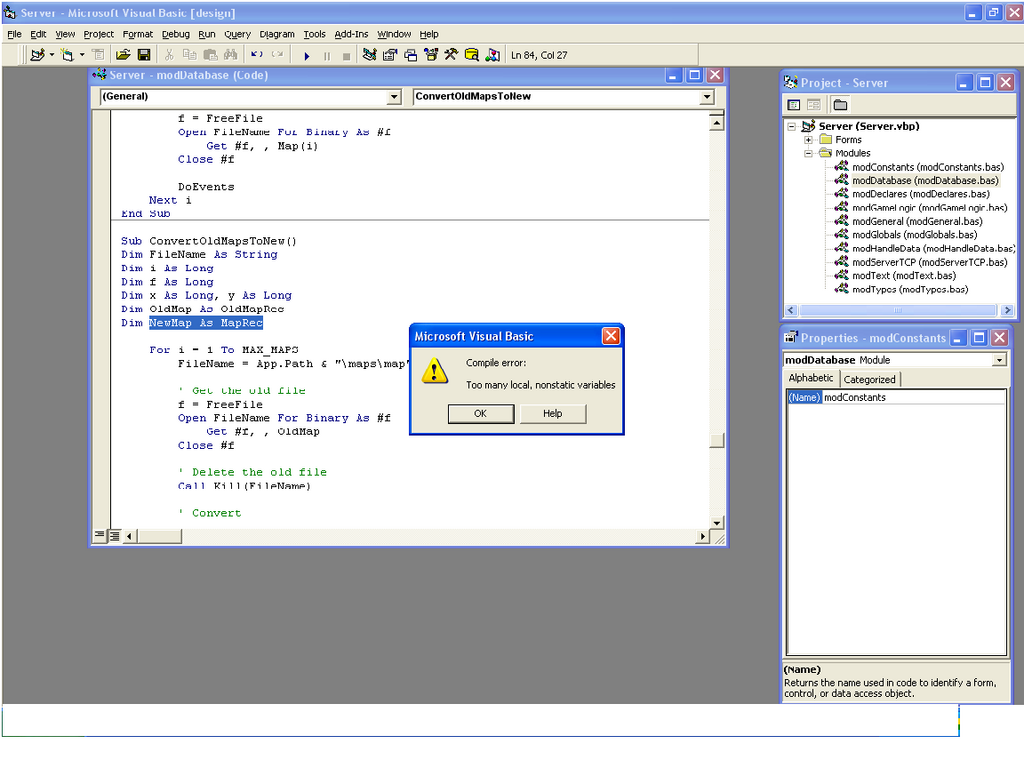 All i did was change the mapx to 64 and mapy to 24 on client/server on Module ModConstant. |
|
| Author: | Robin [ Sat Sep 08, 2007 3:58 pm ] |
| Post subject: | Re: Map Size |
That's a fucking retarded amount of fucking tiles. Change it to something more realistic you tit. |
|
| Author: | Coke [ Mon Sep 10, 2007 12:13 am ] |
| Post subject: | Re: Map Size |
Given that it doesent even count the first tile (since its zero), your having 65x65 tiles, thats 4225 tiles... jeesus christ? |
|
| Page 1 of 3 | All times are UTC |
| Powered by phpBB® Forum Software © phpBB Group https://www.phpbb.com/ |
|